
Lead Generation Made Easy: An In-Depth Review of HeySummit
Streamline your lead generation with HeySummit. This in-depth review covers features, benefits, and strategies to maximize your event's impact.



Published: September 04, 2026
You want tools that speed up work without adding complexity, and Taskade Genesis aims to do exactly that. As an AI-native workspace, it lets you generate live apps, agents, and automations from a single prompt so you can turn ideas into functioning dashboards, client portals, CRMs, and internal tools without jumping between silos.
If you care about real-time collaboration, connecting projects to your data, and trimming the time between concept and deployment, this review explains what Taskade can do for you and why it might become a cornerstone of your workflow.
You can use Taskade Genesis to sketch an idea and quickly turn it into a working workspace without switching tools. On a typical day you might use it for team standups, project roadmaps, shared to-do lists, or client task tracking, while for special projects it helps you build dashboards, client portals, or lightweight internal tools in minutes.
The interface keeps collaboration front and center so you and your teammates edit, comment, and iterate together in real time, and the AI-guided prompts reduce the friction of setup. If you want a flexible, approachable place to build custom workflows and glue them to the apps you already use, Taskade makes that process feel natural and fast.
Pros |
Cons |
|---|---|
✅ Prompt-to-app workflow that accelerates setup |
❌ Advanced automations can take time to refine |
✅ Built-in collaboration with instant updates |
❌ Some extended functionality may require workarounds |
✅ Wide integration surface for common apps |
❌ Mobile features are more limited than desktop |
✅ Useful templates for business workflows |
Situation |
How It Helps |
|---|---|
Small Team Project Management |
You can spin up a shared dashboard, assign tasks, and track progress while everyone edits in real time. |
Client Facing Portals |
You build a client workspace that surfaces deliverables and status updates without handing over raw files or spreadsheets. |
Automating Repetitive Tasks |
You create agents to handle routine workflows like status reports, reminders, or basic data entry to save time. |
Taskade adapts to different roles and rhythms: use it as a simple list manager, a collaborative sprint board, or a lightweight app builder. You can keep things minimal for daily task tracking or layer in automations and integrations as needs grow, which makes it easy to start small and expand without migrating data.
Software |
Integration Quality |
|---|---|
Slack |
Smooth notifications and quick linking between conversations and workspace items |
Google Drive |
Direct access to files and easy attachment for project documentation |
Zapier |
Connector-based automations to bridge Taskade with many other services |
Taskade scales from solo use to team-wide deployments by letting you add workspaces, roles, and integrations as complexity increases. Start with single workspaces for a few projects, then expand into dedicated portals and automated agents that handle recurring processes without breaking existing setups.
Yes. Taskade Genesis is designed so you can prototype and deploy dashboards, client portals, CRMs, and lightweight internal tools from a single prompt, which means you do not need traditional coding to get a working app.
Expect to refine the AI’s output for more complex logic and to wire up integrations, and be prepared to test workflows with sample data. A practical approach is to start with a template, iterate the prompt, and gradually add automations as you confirm behavior.
You should treat integrations and shared workspaces like any connected platform and apply standard controls. Use workspace permissions and limit connector scopes to only the services you need, enable single sign-on and team access controls where available, and keep sensitive data out of agent prompts unless you confirm how the provider handles data. Check Taskade’s security and compliance documentation for specifics and use audit logs and role-based access to reduce exposure when collaborating with external clients or large teams.
Begin with a small, well-defined project so you can see how the prompt-to-app flow works. Pick a template that matches your use case, connect one integration at a time, and test automations with realistic examples. Invite teammates to collaborate early so you can refine roles and naming conventions, and set up simple agents to handle repetitive tasks like reminders or status updates.
Regularly export backups of critical data and treat agents as assistants that still need human review.
You choose Taskade because it turns a single prompt into working apps and automations, so you can prototype dashboards, client portals, and workflows without a developer. Its real-time collaboration and broad integrations let your team stay aligned and connect to existing data, making it easy to scale from simple task lists to custom business tools.
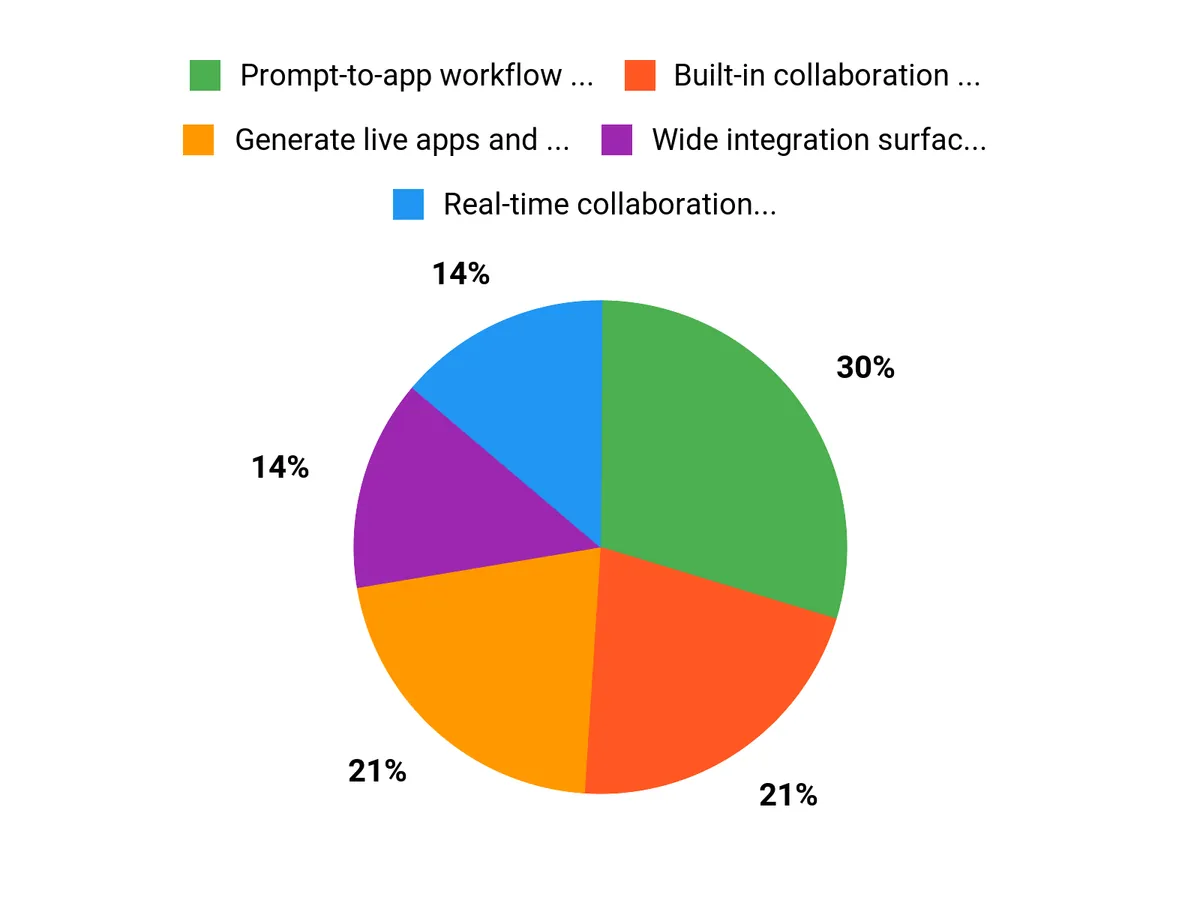
If you want to build dashboards, CRMs, client portals, or automated workflows without hiring developers for every task, Taskade Genesis offers a compelling path. You get prompt-driven app creation, built-in collaboration, and broad integration options so your projects and data stay connected.
For teams and solo operators who prioritize speed, flexibility, and an AI-first approach to building business tools, Taskade is worth exploring as a central workspace.
Streamline your lead generation with HeySummit. This in-depth review covers features, benefits, and strategies to maximize your event's impact.
Master SEO this fall with Mangools Basic. This comprehensive guide covers essential tools and strategies to boost your website's visibility and rankings.

Compare Forento and Learniverse in this comprehensive analysis of their course creation tools, features, pricing, and user experiences for educators.