Simplify Your Life: The Ultimate Guide to Mac Mini and Electronics
Streamline your lifestyle with the Mac Mini and essential electronics. This guide offers practical tips and insights for maximizing efficiency and enjoyment.


Published: March 03, 2026
You may be considering a compact machine that can run large local models, accelerate experiments, and serve as a personal AI workstation. The NVIDIA DGX Spark Desktop Computer packs server-class memory and storage into a small form factor, offering 128 GB of DDR5 RAM, 4 TB of SSD storage, and 128 GB of graphics memory so you can run demanding AI workloads without a rack. This review explains who benefits most from that capability and what setup, compatibility, and reliability trade-offs you should expect before you buy.
Feature |
Verdict |
|---|---|
Performance |
⭐️⭐️⭐️⭐️ – High-memory, fast local compute ideal for LLM inference and development ⏱️ |
Ease of Use |
⭐️⭐️⭐️ – Powerful but expects Linux comfort; you’ll likely use SSH and CLI tools 🔍 |
Software Compatibility |
⭐️⭐️⭐️ – Blackwell GB10 requires NVIDIA NGC containers or manual builds for full GPU acceleration 🧩 |
Value |
⭐️⭐️⭐️ – $4,299.00 buys a desktop supercomputer-class setup, aimed at pros and labs 💸 |
Reliability |
⭐️⭐️⭐️ – Generally quiet and fast for many users, but reported thermal and reboot issues warrant caution ⚠️ |

If you want a compact desktop that actually behaves like a tiny supercomputer, the NVIDIA DGX Spark Desktop Computer is built for that role. You get 128 GB of DDR5 RAM, 128 GB of graphics memory, a 4 TB SSD and an ARM-based Cortex CPU in a small mini PC chassis, so you can run large local models, host inference endpoints, or keep a responsive development sandbox on your desk.
Setup asks that you be comfortable with Linux, SSH and container workflows, and the Blackwell GB10 architecture may require NVIDIA NGC containers or extra builds for full GPU acceleration. If you value local compute, low-latency inference and hardware you control, this is a practical pick; if you need a plug-and-play consumer box with broad out-of-the-box framework compatibility, you might prefer a different path.
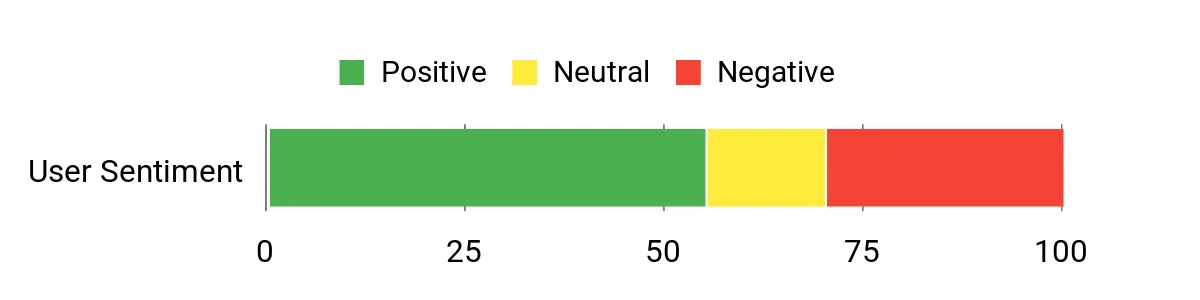
Customers commonly praise the DGX Spark for raw speed, generous RAM and GPU memory, and its usefulness for running local LLMs and home lab projects. People often note it runs quietly and performs well once configured, while several also mention a steep setup curve, the need for Linux skills, intermittent thermal or reboot issues, and extra steps to get mainstream frameworks fully accelerated on the Blackwell GB10 architecture.
Overall Sentiment: Neutral
Pros |
Cons |
|---|---|
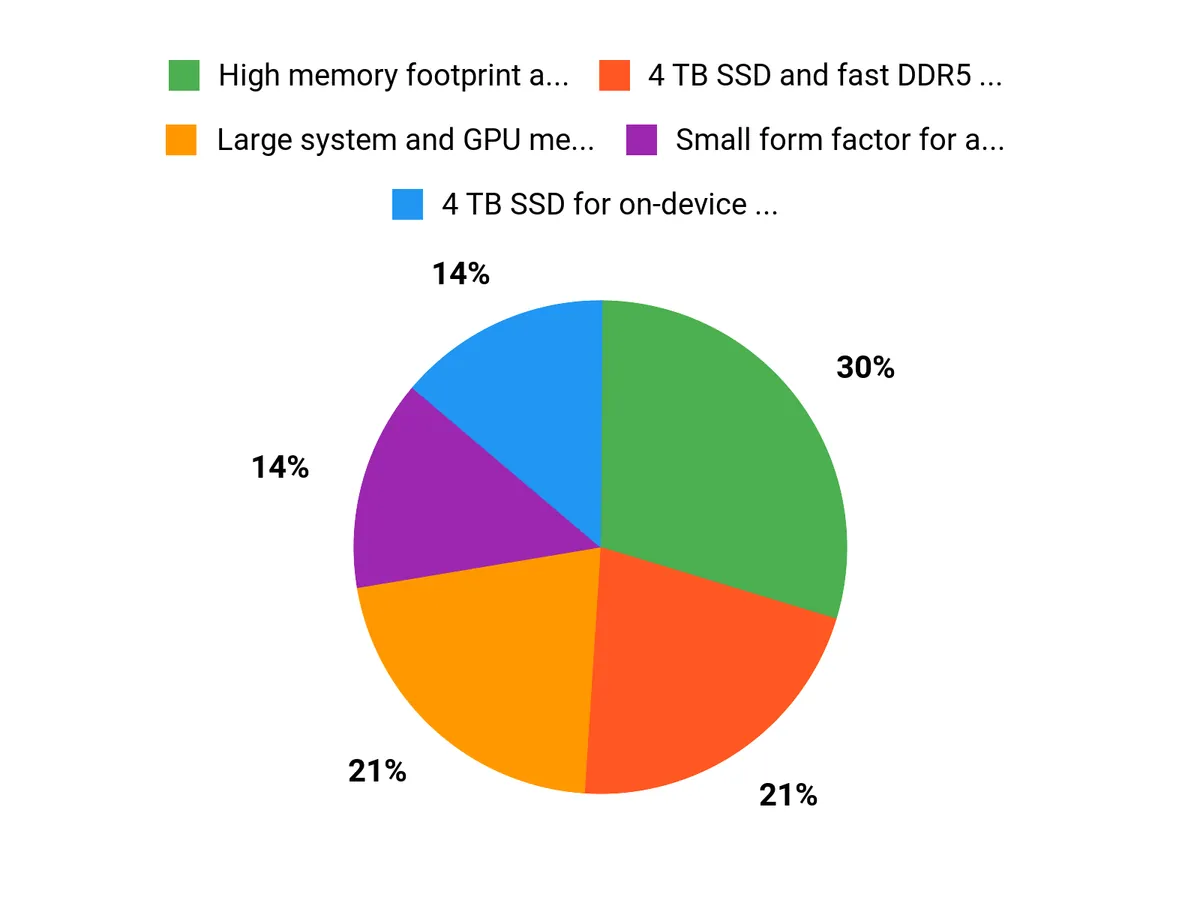
✅ High memory footprint and 128 GB GPU RAM enable larger local models |
❌ Requires Linux comfort and command-line setup for best results |
✅ 4 TB SSD and fast DDR5 make data-heavy workflows smoother |
❌ Blackwell GB10 may need NGC containers or manual compilation for full GPU acceleration |
✅ Small form factor for a desktop supercomputer |
❌ Some users report thermal or unexpected reboot issues |
✅ NVIDIA DGX OS and ecosystem designed for AI workloads |
❌ Limited out-of-the-box peripherals; verify seller and support terms |
Owning a device like this can lower ongoing cloud compute bills if you run frequent experiments or serve inference locally, since you avoid per-hour GPU charges. Consolidating workloads on a personal appliance also reduces data transfer costs and gives you direct control over model and dataset access, though you should factor in potential repair, firmware updates and occasional configuration time.
Your ROI comes from saved cloud spend, faster iteration cycles and the ability to run private models locally. For research, teaching, or a small team that iterates constantly, those time and cost savings can add up quickly. The flip side is that setup time, possible warranty or thermal issues, and seller support choices can delay that payoff if you are not prepared.
Situation |
How It Helps |
|---|---|
Home Lab / Hobbyist |
You can experiment with large local models and run hobby LLMs without paying cloud fees, provided you can handle Linux and container workflows. |
Research And Education |
It gives you a compact, high-memory workstation for training or inference demos, classroom projects, and reproducible experiments under your control. |
Small Team Or Startup |
Teams that need low-latency APIs or on-prem inference can prototype and serve models directly from this desktop while keeping data private. |
Feature |
Ease Level |
|---|---|
Initial Setup |
Moderate |
Software Compatibility |
Hard |
Daily Use |
Easy (once configured) |
Maintenance and Updates |
Moderate |
The DGX Spark covers a wide range of AI tasks from local LLM inference to model testing, edge prototype development and education. Its high memory and storage make it adaptable, though some workflows will need containerized or custom-built software to fully utilize the hardware.
Packing the Grace Blackwell GB10 architecture and large GPU memory into a mini PC is an innovative move toward personal AI supercomputing. It brings server-class resources to a desktop format, but the new architecture also creates short-term software compatibility trade-offs.
NVIDIA is a leading name in AI hardware and ecosystems, and DGX branding carries enterprise credibility. Some buyers report mixed support experiences depending on the seller, so you should prefer direct or trusted channels and check warranty and return policies.
Many users find the hardware quiet and fast, but reported thermal or reboot problems and software hiccups appear in a subset of reviews. Reliability is generally good when the system is configured correctly, but plan for initial tuning and verify support options.
Current Price: $4,299.00
Rating: 4.0 (total: 28+)
Learn MoreYou should be comfortable with Linux and the command line to get the most from the NVIDIA DGX Spark Desktop Computer. Basic tasks like SSH, container management and driver updates are common during setup, and some users rely on a second machine or phone to complete initial network and SSH configuration.
If you’re new to Linux, plan for a learning curve or factor in the time to follow setup guides and use NVIDIA’s documentation or community resources.
Framework compatibility depends on the Blackwell GB10 architecture; many mainstream PyTorch stable binaries do not yet include native support for this instruction set, so you may need to use NVIDIA’s NGC Docker containers or compile frameworks from source to enable full GPU acceleration. Using containerized NGC images is the easiest path to GPU-accelerated workloads and avoids many driver mismatches, but if you need a bare-metal installation be prepared for extra configuration and testing.
If you run frequent local inference, develop large models, or need a compact on-premise AI workstation, the DGX Spark can be a strong investment thanks to 128 GB DDR5 RAM, 4 TB SSD and 128 GB GPU memory, and it can reduce recurring cloud GPU costs compared with heavy cloud usage. At $4,299.00 weigh the potential savings against reported setup and thermal quirks and verify warranty and seller terms; prefer buying direct from NVIDIA or trusted retailers to avoid extra restocking risks and to ensure timely support.
Choose the NVIDIA DGX Spark Desktop Computer when you want server-class memory and GPU capacity in a compact desktop, as 128 GB DDR5 RAM, 128 GB of GPU memory and a 4 TB SSD let you run large local models and low-latency inference without constant cloud spend. You should be comfortable with Linux and container workflows because full GPU acceleration on the Blackwell GB10 architecture often needs NVIDIA NGC images or manual builds, and some users report thermal or setup tuning.
The NVIDIA DGX Spark Desktop Computer is designed for users who need concentrated AI compute in a small desktop footprint: 128 GB DDR5 RAM, 4 TB SSD, 128 GB of GPU memory, an ARM-based Cortex CPU at 3.8 GHz, and NVIDIA DGX OS. If you run local LLMs, model development, or a home lab, you will benefit from its memory capacity and compact design, and many users praise its speed and quiet operation.
Be aware that the Blackwell GB10 architecture currently requires NVIDIA NGC containers or manual compilation for some frameworks to enable native GPU acceleration, so you should be comfortable with Linux and command-line setup. Reports of thermal-related reboots and setup headaches with certain sellers suggest you should buy through trusted channels, verify warranty and return terms, and plan for initial configuration time.
At $4,299.00 it delivers a powerful turnkey option for experienced developers, researchers, and small labs, but it is best suited to you if you can manage Linux-centric setup and accept potential early firmware or thermal quirks rather than expecting a plug-and-play consumer desktop.
Streamline your lifestyle with the Mac Mini and essential electronics. This guide offers practical tips and insights for maximizing efficiency and enjoyment.

Maximize your investment potential with these 8 silver tips for 2026, designed to enhance your portfolio and navigate market trends effectively.